|
|
|
|
|
ActiveX
Controls
for Enterprise
Application Design |
| |
|
|
|
|
|
|
|
|
|
|
|
  |
|
|
|
|
|
|
|
|
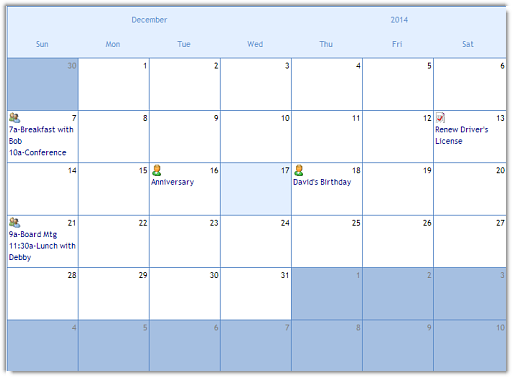
ctMonth is a customizable month view
component for modern Windows UI design. |
|
| |
|
|
| |
ctMonth offers extensive control over
graphical presentations including
independent colors, text, and graphics
for each date allowing developers to
configure the control for a limitless
number of month view presentations and
UI designs. |
|
| |
|
|
| |
|
|
| |
 |
|
| |
|
|
| |
|
|
| |
|
|
| |
Independent Date Attributes
: Each date can be assigned a background
and text color, disable status, text,
and image. |
|
| |
|
|
| |
Drag-And-Drop :
Automatically draws a selected border
around the appropriate date when the
user drags into the component. Fires a
custom DropDate event that identifies
the date on which a drag-and-drop
operation concluded. |
|
| |
|
|
| |
Multi-Select : The
controls supports multiple selection of
dates. |
|
| |
|
|
| |
Image List : Store up
to 100 images in an internal image list. |
|
| |
|
|
| |
Date Handling Methods
: Custom methods to quickly code
LastDay, LastMonth, LastYear, NextDay,
NextMonth, NextYear, or Today. |
|
| |
|
|
| |
Fill Styles : The
background of the title, header, and
dates can all be colored with different
fill styles similar to the GDI+ drawing
routines in .NET. including patters for
horizontal, vertical, diagonal,
horizontal bump, vertical bump, pyramid,
diamond, circular and elliptical
gradient fills. |
|
| |
|
|
| |
Week Numbers : Enables
developers to specify starting day and
month for yearly week numbers and have
the week numbers displayed within the
calendar. |
|
| |
|
|
| |
|
|
| |
 |
|
| |
|
|
| |
|
|
| |
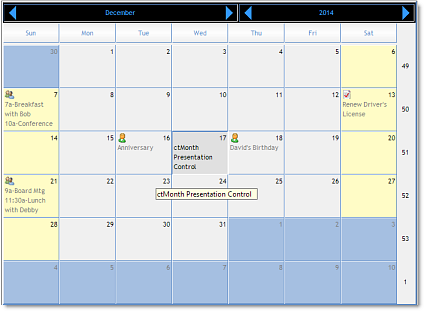
Independent Date Attributes
: Each date can be assigned a background
and text color, disable status, text,
and image. |
|
| |
|
|
| |
Week Numbers : Enables
developers to specify starting day and
month for yearly week numbers and have
the week numbers displayed within the
calendar. |
|
| |
|
|
| |
Task Bars : One or more
task bars can be assigned to a date.
These time bars can be used to represent
ongoing appointments. |
|
| |
|
|
| |
Built-In Print Functions
: Allows developers to define custom
presentation styles for printed output
and provides print methods that pass the
contents of the calendar to a print job
queued in the standard Windows Printer
Dialogue or to a specific printer device
context. |
|
| |
|
|
| |
Print In Window : Also
supports the PrintInWindow method which
prints the contents of the current
calendar on a specific area of a page. |
|
| |
|
|
| |
Definable Text Headers
: Both the month and day names can
easily be changes so that the control
can handle all single byte character
languages and fonts. |
|
| |
|
|
| |
Presentation Styles :
ctMonth offers developers the ability to
apply the latest modern Windows themes
and styles. |
|
| |
|
|
| |
Definable Weekends :
Defines the days associated with the
weekends and assign a custom background
color for them. |
|
| |
|
|
| |
|
|
| |
|
|
|
|
| |
|
|
|
|
| |
|
|
|
|
| |
 |
|
| |
|
|
|
|
| |
|
|
|
|
| |
|
|
|
|